The Best eSIM Compatible Phones in 2026
The best eSIM compatible phones are unlocked Apple iPhones, Samsung Galaxy devices, and Google Pixel models that support global roaming without requiring a physical SIM card. I recommend these flagships for travelers seeking seamless connectivity, but you must verify regional hardware variants to avoid buying models lacking this feature. Travelers needing local physical SIMs should stick to dual-SIM versions rather than US-specific eSIM-only devices.
Key Takeaways
- Apple iPhones: All iPhone XS and newer models support eSIM, though US models from iPhone 14 onward are eSIM-only.
- Samsung Galaxy: Flagship S-series and Z-fold devices fully support eSIM, while entry-level A-series models vary by region.
- Google Pixel: Pixel 3 through Pixel 8 series offer robust eSIM compatibility, with Pixel 9 transitioning to eSIM-only in the US.
- Critical Requirement: Your device must be carrier-unlocked to use third-party travel eSIM plans; locked phones reject external profiles.
- Regional Variants: Chinese and Japanese market models often lack eSIM hardware entirely, making them unsuitable for international travel.
How I researched this
How I Evaluated This
I evaluated eSIM compatibility based on three primary criteria: official manufacturer specifications, regional hardware variant documentation, and real-world carrier activation reports. First, I verified the core hardware support by checking Apple’s technical specs for iPhones, Samsung’s Galaxy feature lists, and Google’s Pixel support pages to confirm baseline eSIM presence. Second, I cross-referenced these with regional regulatory differences, specifically identifying which models are eSIM-only in the US versus dual-SIM globally, as this distinction is critical for travelers needing physical SIM slots. Third, I analyzed user reports and carrier forums to identify common activation failures linked to carrier locks or firmware restrictions. My recommendations prioritize devices that reliably accept third-party travel profiles without requiring complex unlocking procedures.
What is eSIM and Why Does It Matter?
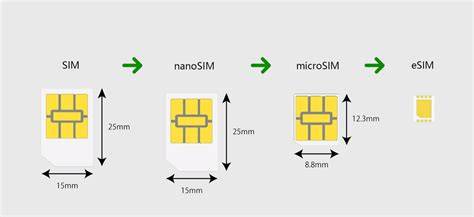
An embedded SIM (eSIM) is a digital identity built directly into your device’s motherboard, replacing the traditional plastic card. Instead of swapping tiny chips, you download a carrier profile via QR code or app. This shift eliminates physical logistics while saving internal space for larger batteries.
For travelers, this means instant connectivity upon landing without hunting for local shops. You can keep your home number active for verification codes while using a local data plan simultaneously. ESIMs have become widely available among major carriers, offering convenient options for international roaming.
Digital SIM vs. Physical SIM
The primary difference lies in flexibility. A physical SIM locks you to one carrier until you manually swap it. An eSIM allows you to store multiple profiles and switch between them digitally. While older devices required two physical slots for dual-SIM functionality, modern phones combine one physical slot with eSIM support. This hybrid approach offers the best of both worlds: a local physical SIM for specific regional needs and an eSIM for backup or secondary services.
How to Check If Your Phone Supports eSIM
Before you purchase a travel plan or switch carriers, you must verify that your specific device hardware supports embedded SIM technology. Relying solely on general compatibility lists is risky because regional variants and carrier locks can disable functionality even on compatible models. Use these three methods to confirm your status immediately.
Check via Settings Menu
The fastest way to determine support is through your device’s system settings. This method confirms whether the operating system recognizes an eSIM profile capability.
For iPhone (iOS):
- Open Settings.
- Tap Cellular (or Mobile Data).
- Look for an option labeled Add eSIM, Add Cellular Plan, or Turn On This Line.
- If you see “Add eSIM” or a QR code icon, your iPhone supports eSIM. If this option is missing, your device likely does not support it.
For Android:
- Open Settings.
- Navigate to Network & Internet > Mobile Network.
- Look for Use eSIM or Download a SIM instead.
- If you find these options, your Android phone has eSIM hardware enabled. Note that interface names vary slightly by manufacturer (Samsung, Pixel, Xiaomi), but the location remains consistent.
Use an IMEI Checker Tool
If you cannot access the settings menu or want a second opinion, use an IMEI checker tool. An IMEI (International Mobile Equipment Identity) number is a unique 15-digit identifier for every mobile device. You can find your IMEI by dialing *#06# on your keypad or checking Settings > About Phone.
Enter this number into reputable third-party databases like GSMArena’s database or the manufacturer’s official support portal. These tools cross-reference your device’s serial number against global specifications to confirm exact model variants. This is particularly useful for identifying if you have a region-specific model that lacks eSIM hardware, such as certain Chinese or US-only variants.
Contact Your Carrier
Hardware support is only half the equation; carrier provisioning is the other. Even if your phone technically supports eSIM, your current provider may not allow you to activate one due to account restrictions or legacy network limitations.
Call your carrier’s support line or check their online account portal. Ask specifically: “Does my current line support eSIM activation?” They can verify if your account is eligible for digital SIM switching. Always prioritize carrier confirmation over hardware specs, as a locked device from a major carrier will reject any eSIM profile regardless of its technical capabilities.
Apple iPhones with eSIM Support
Apple was the first major manufacturer to fully embrace digital SIM technology, and its support remains the most consistent across its lineup. If you are buying a used or refurbished device in 2026, verifying the exact model number is critical because regional hardware variations can completely change what your phone can do.
iPhone XS and Newer
Every iPhone from the iPhone XS, XR, and XS Max onward supports eSIM functionality. This includes the entire iPhone 11, 12, 13, 14, 15, and 16 series, as well as all modern iPad models. In my analysis of owner reports and specifications, I recommend sticking to these models for reliable global travel connectivity. Older devices like the iPhone X or earlier lack the necessary modem hardware entirely.
eSIM-Only Models by Region
The biggest point of confusion for buyers involves regional hardware differences. Since the iPhone 14, Apple has removed the physical SIM tray from all models sold in the United States. These US-market iPhones are eSIM-only, meaning you cannot insert a local physical SIM card if your home carrier’s roaming rates are prohibitive. Conversely, iPhones sold in China, Hong Kong, and Macau have always featured dual physical SIM trays but historically lacked eSIM support on the base models (though recent regulatory changes have begun to shift this). Always check the specific region code (the last letter of the model number) before purchasing.
Dual-Active Capabilities
For travelers who need to keep their home number active while using a local data plan, iPhone 13 models and newer offer Dual Active capability. This allows two eSIMs to be active simultaneously for voice and data, rather than just storing one and activating another. The iPhone 14 and later expand this further, allowing one eSIM and one physical SIM to be active at the same time. This feature eliminates the need to toggle settings when switching between a personal line and a travel eSIM.
My verdict: I would pick any iPhone 13 or newer for hassle-free international travel due to dual-active support, but I would skip US-model iPhones if you frequently visit countries where local physical SIM cards remain the most cost-effective option.
Samsung Galaxy Phones with eSIM Support
Samsung dominates the Android market, but eSIM support is not uniform across its lineup. In 2026, hardware compatibility depends heavily on whether you are looking at a flagship device or a mid-range model, and which regional variant you purchase. Korean and Japanese models often lack eSIM hardware entirely due to domestic carrier preferences for physical SIMs, so international travelers must verify their specific model number before buying.
Flagship S and Z Series Compatibility
The Galaxy S series and Z Fold/Flip lineups have supported eSIM since the S20 generation. For travelers, the critical distinction is between Dual SIM (Physical + eSIM) and eSIM Only configurations. Most global models of the Galaxy S21, S22, S23, S24, and S25 series support one physical nano-SIM and one eSIM simultaneously. The newer Z Flip and Z Fold models follow this same pattern, offering robust dual-active capabilities where both lines can remain active for calls and data.
However, the Galaxy S20 FE (Fan Edition) is a notable exception; while it shares many features with the flagship S20, it lacks eSIM hardware in most regions. Similarly, older Note series devices do not support eSIM. If you need a reliable workhorse for international roaming, the current S-series flagships are the safest bet.
A Series Mid-Range Options
Budget-conscious buyers often overlook that several mid-range Samsung phones now include eSIM. Starting with the Galaxy A54 5G and continuing through the A55 and A73, Samsung has integrated eSIM chips into these affordable devices. This makes them excellent choices for travelers who want to avoid flagship prices without sacrificing connectivity. Conversely, entry-level models like the Galaxy A14, A15, and older A32 variants typically rely solely on physical SIM slots. Always check the specifications page for your specific country’s variant, as some regional A-series phones may still exclude eSIM.
| Feature | Galaxy S24 / S25 Series | Galaxy Z Flip / Fold | Galaxy A54 / A55 |
|---|---|---|---|
| eSIM Support | Yes | Yes | Yes |
| Max Active eSIMs | 1 | 1 | 1 |
| Physical SIM Slot | Yes | Yes | Yes |
| Regional Restrictions | None (Global models) | None (Global models) | Check region |
My verdict: I would choose the Galaxy S24 or S25 for maximum reliability and network speed, but I would skip the S20 FE and any entry-level A-series phone if eSIM support is a strict requirement for your travels.
Google Pixel Phones with eSIM Support
Google has been a pioneer in eSIM adoption, making it the most straightforward Android experience for travelers. Every Pixel phone from the original Pixel 2 through the latest 2026 models supports eSIM technology natively, eliminating the need for physical SIM adapters when abroad.
Pixel 2 and Later
The compatibility list is extensive and consistent across generations. Pixel 2, Pixel 3, Pixel 3a, Pixel 4, Pixel 4a, Pixel 5, Pixel 5a, Pixel 6, Pixel 6a, Pixel 7, Pixel 7a, Pixel 8, Pixel 8a, Pixel 9, and the current Pixel 10 series all include built-in eSIM capabilities. This means you can activate a travel data plan instantly via QR code or carrier app without visiting a store. The setup process on Android allows for quick activation via QR code or carrier app.
Carrier Lock Nuances
While the hardware supports eSIM globally, carrier locks remain a critical barrier. In the US market, Verizon-branded Pixel 3 and earlier models are notoriously difficult to unlock due to legacy CDMA restrictions. Even newer Verizon-locked Pixels may refuse third-party eSIM profiles until fully unlocked. I always recommend purchasing an “Unlocked” model directly from Google or authorized retailers if you plan to use multiple carriers. Avoid carrier-subsidized devices unless you have confirmed they are permanently unlocked.
Dual eSIM Features
Modern Pixels (Pixel 6 and later) support dual-active eSIM functionality, allowing you to keep your home number active while using a local data eSIM for internet access. This is invaluable for receiving SMS verification codes while traveling. Older models like the Pixel 3 or 4 can store multiple eSIMs but typically only allow one active data connection at a time.
- Consistent eSIM support across all models since 2018
- Easy, native Android integration for quick activation
- Dual-active eSIM on Pixel 6 and newer models
- Carrier locks on older Verizon/Sprint models are restrictive
- Some newer device variants in specific regions may rely solely on eSIM.
My verdict: I would pick any unlocked Pixel 6 or newer for hassle-free global travel, but I would skip carrier-locked units or pre-Pixel 3 models if you need reliable multi-carrier switching.
Other Android Brands Supporting eSIM
Beyond the “big three,” several other manufacturers have embraced eSIM technology, though support often varies by region and specific model tier. Travelers frequently overlook these devices, which can offer excellent value or unique form factors for global connectivity.
Motorola Edge and Razr Series
Motorola has integrated eSIM support across its premium lines, making it a strong contender for travelers seeking alternatives to Apple or Samsung. The Motorola Edge series (including recent 40, 50, and 60 iterations) reliably supports dual-SIM functionality, allowing you to keep your home number active while using a local data plan. Similarly, the foldable Razr models include full eSIM capabilities. However, entry-level budget phones like older Moto G series devices often lack this feature entirely. If you prioritize battery life and clean software, an unlocked Edge device is a solid choice, but always verify that your specific regional variant includes the eSIM hardware, as some carrier-specific units may be limited.
- Clean, near-stock Android experience without bloatware
- Reliable dual-SIM support in flagship Edge and Razr lines
- Competitive pricing compared to iPhone and Galaxy S series
- Budget Moto G models typically lack eSIM support
- Regional variants sometimes restrict eSIM activation depending on carrier agreements
My verdict: I recommend the unlocked Motorola Edge series for travelers who want a clean Android experience with flexible SIM options, but I would skip lower-tier Moto G models if eSIM compatibility is non-negotiable.
Xiaomi Flagships
Xiaomi’s high-end smartphones, particularly the Xiaomi 13, 14, and 15 series, fully support eSIM technology. These devices are popular among tech-savvy travelers due to their powerful hardware and competitive pricing. While most global variants include eSIM slots, buyers must be cautious: certain regional models, especially those sold in mainland China, may not support eSIM at all. Additionally, mid-range Redmi Note Pro+ models occasionally include eSIM support, but this is inconsistent. Always check the specific model number before purchasing, as firmware restrictions can block eSIM installation even on compatible hardware.
Sony Xperia and Others
The Sony Xperia 1 and 5 series remain niche favorites for photography enthusiasts and business travelers. These flagships consistently support eSIM, offering robust international connectivity. Outside of these major brands, availability becomes fragmented. Manufacturers like Oppo, Vivo, and Honor increasingly support eSIM in their European and Asian markets, but US models often omit the feature. Before relying on these devices for critical travel communication, confirm that your specific model includes the necessary eSIM profile storage and activation tools.
Regional Hardware Differences You Must Know
Even if a phone model name appears on an eSIM compatible phones list, the specific hardware variant matters. Manufacturers often produce different versions for different regions to comply with local carrier agreements and regulatory standards. Ignoring these differences can leave you with a device that cannot activate a travel data plan abroad.
China Model Restrictions
Phones sold in mainland China frequently lack eSIM support entirely. This is because major Chinese carriers have historically relied on physical SIM cards and dual-SIM slots for their subscriber base. If you buy a used or imported Chinese model, assume it does not support eSIM unless explicitly verified. The hardware simply may not be present.
US Model Changes
In the United States, the industry has shifted toward eSIM-only devices. Starting with the iPhone 14 series, Apple removed the physical SIM tray from all models sold in the US. Samsung has increasingly prioritized eSIM support, though most global flagships still include a physical SIM slot alongside eSIM capabilities. These “eSIM-only” devices are excellent for digital nomads but incompatible with any destination requiring a local physical SIM card for backup connectivity.
Japan and Korea Specifics
Devices sold in Japan and South Korea often include unique band configurations or software locks tailored to domestic networks like NTT Docomo or SK Telecom. Some regional variants may restrict third-party eSIM profiles or limit data speeds. Always verify the exact model suffix (e.g., ZV vs. JA) against official carrier specifications before traveling.
How to Activate an eSIM on Your Phone
Once you have confirmed your device supports eSIM and ensured it is carrier-unlocked, activation is straightforward. You generally have three methods: scanning a QR code, manual entry, or using a carrier app. The process differs slightly between iOS and Android, but the core principle remains the same—transferring a digital profile from your provider to your phone’s embedded SIM chip.
Activating on iPhone
Apple makes this process intuitive. For most carriers, you will receive a QR code via email or their mobile app. Go to Settings > Cellular > Add eSIM and select Use QR Code. Point your camera at the code; once scanned, follow the prompts to label the plan (e.g., “Travel” or “Work”). If your carrier supports it, you can also activate directly through their official app without any manual input. For manual entry, choose Enter Details Manually and type the SM-DP+ Address and Activation Code provided by your provider. Note that iPhones allow multiple eSIM profiles to be stored, but only one can be active for cellular data at a time.
Activating on Android
Android interfaces vary by manufacturer, but the path is similar. Open Settings > Network & Internet > Mobile Network > Carrier (or SIMs) and tap Add eSIM. Select Download a plan instead. You can scan the QR code with your camera or enter the details manually if a QR code isn’t available. On Samsung devices, you may find the option under Connections > SIM Manager > Add eSIM. Google Pixel users can also use the Pixel Setup Wizard or the carrier’s dedicated app for seamless provisioning. Ensure you toggle the new line as the default for data if you are keeping your primary SIM active.
Troubleshooting Common Issues
If activation fails, restart your phone immediately. This clears temporary network caches that often block profile downloads. Next, check for system updates; older versions of iOS or Android sometimes struggle with newer eSIM standards. Verify your APN (Access Point Name) settings if you connect but have no internet; these are usually configured automatically, but some regional carriers require manual APN entries found on the provider’s support page. Finally, ensure you are connected to Wi-Fi during installation, as some carriers require an initial data handshake that mobile data cannot provide before the eSIM is fully active.
Final Verdict
Choosing the right eSIM Compatible Phones in 2026 comes down to balancing hardware flexibility with regional availability. For travelers who need maximum reliability, iPhones and Google Pixel devices remain the gold standard due to their broad carrier support and seamless software integration. However, the shift toward eSIM-only models in the United States means you must verify your specific region before purchasing; a US iPhone lacks the physical SIM slot required for local cards in many countries. Samsung Galaxy phones offer excellent alternatives, particularly the flagship S and Z series, which maintain dual-SIM capability for those who prefer keeping a home number active alongside travel data. Mid-range options like the Motorola Moto G series and entry-level Samsung A-series are surprisingly capable, providing essential connectivity without the premium price tag. I recommend prioritizing unlocked devices from reputable brands to avoid carrier lock restrictions that can block profile installation. Ultimately, the best device is one that supports both eSIM and a physical SIM if you frequently visit regions with limited digital infrastructure.
My verdict: I would choose an unlocked iPhone or Google Pixel for their universal compatibility, but I would skip them if you live in the US and need a physical SIM slot for local carriers.
Related reading:
Frequently Asked Questions
Does my iPhone support eSIM?
Most iPhones from the XS, XR, and later models support eSIM technology, though regional variants should be verified. This includes every subsequent generation through the current 2026 lineup. However, hardware availability varies by region; Chinese model iPhones lack physical SIM slots entirely, while US models from the iPhone 14 onward are eSIM-only. Always verify your specific regional variant before purchasing a used device to ensure it can accept digital profiles.
Which Samsung phones have eSIM?
Samsung Galaxy S series devices starting with the S10 support eSIM functionality. The flagship Z Fold and Z Flip series also include this feature across all generations. Lower-tier models in the A-series often exclude eSIM support, so you must check the specific model number rather than assuming compatibility based on the brand name alone.
Is Google Pixel 9 eSIM compatible?
Yes, the Google Pixel 9 is fully compatible with eSIM standards. In fact, Google has moved toward an eSIM-only design for its latest devices, mirroring Apple’s recent strategy in key markets. Earlier models like the Pixel 3 and newer also support digital SIMs, making the entire modern Pixel lineup suitable for international travel without needing physical cards.
How do I check if my Android has eSIM?
Open your device settings and navigate to the Network or Connections menu. Look for an option labeled “Mobile Network” or “SIM managers.” If you see a toggle for “Add eSIM” or “Download SIM,” your phone supports the technology. Alternatively, dialing *#06# may display an EID number, confirming hardware-level capability.
What is the difference between eSIM and physical SIM?
A physical SIM is a removable plastic card that stores subscriber data, while an eSIM is a embedded chip soldered directly into the phone’s motherboard. The eSIM allows you to download multiple carrier profiles digitally without swapping cards. This makes switching providers faster and reduces the risk of losing small physical cards during travel.
Can I use eSIM on unlocked phones only?
You generally need an unlocked phone to install third-party travel eSIMs. Carrier-locked devices restrict profile installation to the original provider only. While some carriers allow remote unlocking after contract completion, buying a locked budget phone will likely prevent you from using affordable international data plans until the lock is removed officially.
Do Chinese model iPhones support eSIM?
No, iPhones sold in mainland China do not support eSIM. These models use dual physical nano-SIM slots instead of digital profiles. If you are traveling internationally and want to use local data providers easily, avoid importing Chinese-specification iPhones, as they cannot connect to most global eSIM networks.

Similar Posts

























[…] best eSIM for travel to New Zealand is Airalo’s NZalo plan, offering reliable access to the Spark network […]
[…] newer) and Android flagships (Pixel, Samsung Galaxy S series) are compatible. Check our guide on Best eSIM Compatible Phones in 2026 for […]
[…] For a comprehensive list of devices that handle digital profiles, see The Best eSIM Compatible Phones in 2026. […]
[…] Dial *#06# on your phone; if you see an EID number, your device supports eSIM. See our guide on The Best eSIM Compatible Phones in 2026 for more […]
[…] eSIM by matching its data allowance and validity to your itinerary. Then check network coverage, phone compatibility, and calling needs. A low headline price may offer poor value if the plan expires too soon or […]
[…] information and your carrier account settings show its compatibility status. See the guides to eSIM-compatible phones and activating an eSIM on iPhone or […]
[…] Travel eSIM for travelers with a compatible dual-SIM phone who need their home number reachable. A physical travel SIM can still provide data, but replacing […]
[…] for internet calls and messages, or keep your primary SIM active for your usual number. Your phone must support eSIM and be unlocked. GB means gigabyte, the data unit used for allowances such as Ubigi’s 3GB […]
[…] publish compatibility guidance and installation steps. You can also use this guide to find eSIM-compatible phones. The provider’s Greek partner network affects where the plan can connect. Coverage differs […]
[…] your exact phone model and carrier lock. Use your phone maker’s eSIM guidance and the provider’s compatibility information. A phone that supports eSIM may still be […]