Best Free Online Route Planners for Multi-Stop Trips
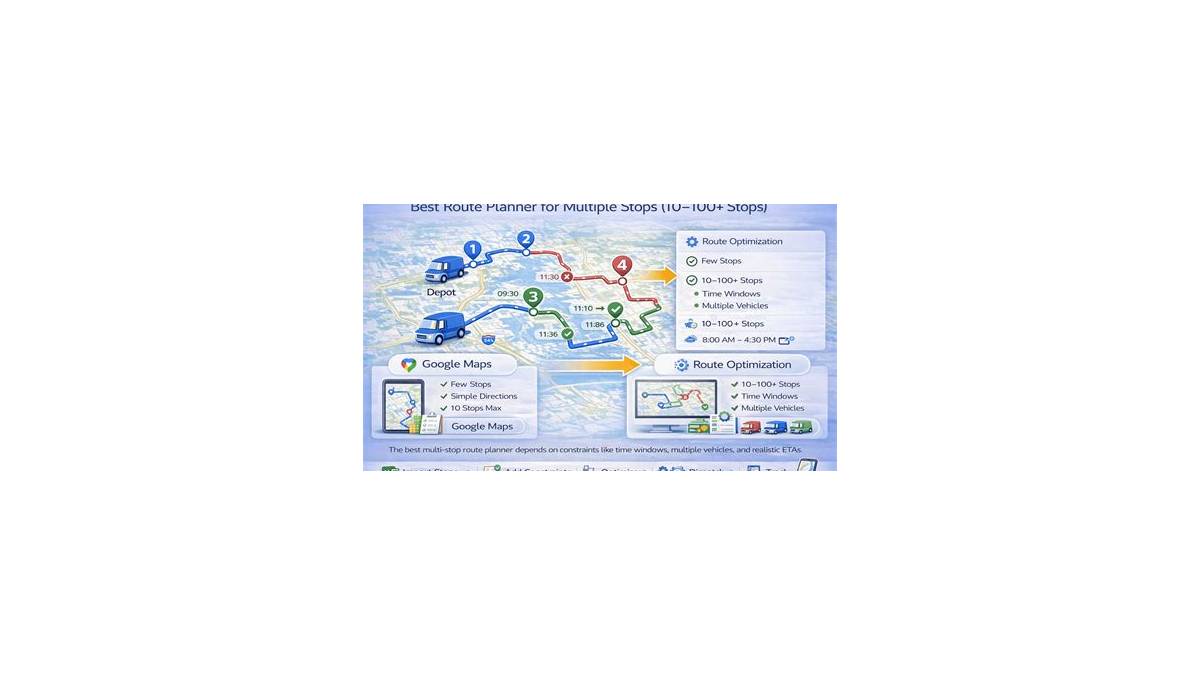
Driving multiple stops without a planned sequence wastes fuel and doubles your driving time behind the wheel. Finding the best free online route planners helps you organize your stops into the most efficient driving order possible. Most drivers assume standard mapping apps handle this task automatically, but common navigation tools rarely reorganize your stops on their own.
Transportation studies from the Federal Highway Administration reveal that uncoordinated vehicle routing increases unnecessary road mileage by up to twenty percent. Choosing a platform that calculates the shortest path between multi-stop destinations solves this problem before you start your engine. Understanding how these tools balance stop limits, file imports, and mobile exports will keep your travel days smooth and affordable.
Best Free Online Route Planners
The best free online route planners reorganize multiple stops to save driving time. RouteXL optimizes up to 20 stops per day at zero charge. MapQuest Route Planner permits free routing for up to 26 total stops.
Speedy Route reorders 10 stops quickly for local multi-stop delivery trips. These free platforms eliminate back-tracking and reduce overall fuel expenses.
The Real Difference Between Route Mapping and True Route Optimization
Most people confuse route mapping with true route optimization. Route mapping simply connects points in the exact order you type them. If you add five addresses, a basic mapping tool creates a straight line from address one to address two, regardless of the geometry.
It does not look at the bigger picture.
True route optimization relies on advanced computer algorithms. It tackles a famous logistical challenge known as the Traveling Salesperson Problem. The mathematical goal is simple: visit every required location once and return to the start via the shortest possible distance.
An optimization engine checks hundreds or thousands of sequence combinations in seconds. It reorders your middle stops so you never drive past an upcoming destination only to backtrack thirty minutes later.
Why Sequential Mapping Costs You Money
Sequential mapping forces you to guess your own stop order. Humans are notoriously bad at calculating spatial efficiency across more than four locations. You might group stops by neighborhood, but you will easily miss bridge choke points, highway exits, and one-way grids.
Poorly planned routes create phantom mileage. You burn extra fuel, put unnecessary wear on your tires, and spend extra hours sitting at red lights. Over a month of field visits or delivery shifts, poor sequencing can cost hundreds of extra dollars in maintenance and gas.
How Optimization Engines Think
Optimization software evaluates travel time, road speed limits, and total physical distance. Modern systems pull vector data from platforms like OpenStreetMap or private digital road networks.
The software builds a distance matrix between every single point on your list. Then, heuristic routines like genetic algorithms or local search methods prune away inefficient paths. The end result is a smooth loop or an efficient point-to-point line that minimizes your total hours on the road.
Quick Benchmark: Comparing the Top Free Route Planners
Free routing platforms vary widely in their daily limits, features, and user interfaces. Some tools focus entirely on high-volume address imports. Others focus on smooth mobile integration for turn-by-turn driving.
As of 2026, the options below represent the most reliable free services available for everyday drivers and small business operators.
The table below breaks down the primary technical specifications for each major free planner.
| Route Planner | Free Stop Limit | Automated Reordering | Import Methods | Best Use Case |
|---|---|---|---|---|
| RouteXL | 20 stops / route | Yes | Spreadsheet paste, CSV upload | Small deliveries and field service visits |
| MapQuest | 26 stops / route | Yes | Manual entry, copy-paste list | Errands, local trips, road travel |
| Speedy Route | 10 stops / route | Yes | Manual text entry | Fast local delivery runs |
| Google Maps | 10 stops / route | No (Manual drag only) | Manual search only | Live turn-by-turn mobile navigation |
| Circuit | 10 stops / route | Yes | In-app address search | Mobile courier multi-stop runs |
When picking a tool, your stop count determines your choices immediately. If you have 18 stops, Google Maps and Speedy Route are unusable on their free tiers. You will need RouteXL or MapQuest to build that schedule without opening your wallet.
If you are planning an extended journey after securing a budget vacation package, MapQuest or Google Maps often works best for scenic flexibility. Commercial operators with tight schedules usually prefer RouteXL for its spreadsheet parsing.
RouteXL: Best for Small Delivery Runs and Spreadsheet Imports
RouteXL remains a workhorse for independent delivery drivers, real estate professionals, and field technicians. The platform runs directly inside your web browser without requiring account registration for basic usage. Its core strength lies in fast mathematical optimization across up to 20 stops per day for free.
The interface looks spartan and functional rather than modern. However, underneath the plain exterior is a very capable calculation engine. It uses road network data from OpenStreetMap, making it accurate for both urban streets and rural bypasses.
Data Import and Geocoding Flexibility
Typing addresses by hand is slow and causes typing errors. RouteXL solves this by allowing users to copy and paste text directly from spreadsheets.
You can format a simple table in Google Sheets or Microsoft Excel with street, city, state, and postal code. Paste the block into RouteXL's import window, and the software translates those text lines into map coordinates automatically.
The geocoding system handles standard street suffixes and postal codes reliably. If an address seems ambiguous, the interface flags the pin in yellow or red. That color coding lets you drag the pin to the correct curb before running the optimization.
Step-by-Step Optimization Process
Using RouteXL takes only a few minutes once you understand the basic workflow:
- Open the web interface and click the Import button.
- Paste your list of addresses or enter them one by one using the search bar.
- Review the generated pins to confirm all locations landed in the right zip codes.
- Set your departure location as the route start point.
- Select whether you need a round trip back to base or an open-ended finish at the last stop.
- Click the Optimize button to let the algorithm reorder the stops.
The calculated route highlights your driving path across the map canvas. The left panel updates with an ordered list, complete with estimated arrival times and cumulative mileage.
Practical Limitations
The 20-stop ceiling is a strict limit on the free tier. If you have 21 stops, the algorithm refuses to run until you delete a stop or purchase upgrade credits.
RouteXL also lacks a dedicated standalone mobile app. To use the calculated path on your phone, you must export the coordinates via a shared URL, email link, or QR code. Drivers working in regions with spotty cellular coverage must ensure their mobile browser caches the directions properly before leaving Wi-Fi.
MapQuest Route Planner: Best for Simple Optimization Up to 26 Stops
MapQuest is one of the oldest web mapping systems on the internet, and its Route Planner tool remains generous for budget-minded users. While many competing platforms reduce free access down to single digits, MapQuest allows you to route up to 26 stops without paying a dime.
The platform is designed around consumer simplicity. You do not need any technical knowledge of logistics or data formatting to build a clean route.
Flexible Optimization Settings
MapQuest gives users practical control over how the algorithm reorders their itinerary. Many free tools only calculate the shortest physical path in road miles. MapQuest allows you to choose between the shortest total distance or the shortest driving time.
This distinction matters in metropolitan areas. A highway bypass might add five physical miles to your route while saving twenty minutes of idling through stop-and-go downtown streets. The algorithm adjusts the sequence based on your specific priority.
You can also toggle standard routing preferences with a single click:
- Avoid toll roads to cut out highway charges.
- Avoid seasonal highway closures and ferry crossings.
- Avoid standard highways if you prefer secondary roads.
- Enforce a round-trip schedule or terminate the trip at a separate final address.
Entering and Managing Addresses
Address entry inside MapQuest is straightforward. You can type addresses into the sequential boxes on the left panel, and the search engine autocompletes street names based on your regional location.
For larger batches, MapQuest provides a bulk input box. You can paste a list of addresses separated by line breaks. The geocoder processes the entries quickly, though it can struggle with misspelled town names or missing postal codes.
It helps to verify the pins on the interactive map before clicking the reorder button.
Real-World Drawbacks
The biggest drawback of MapQuest is its ad-heavy desktop interface. Banner ads and video placements surround the map workspace, which can cause older web browsers to lag or stutter during scrolling.
The mobile handoff can also feel awkward. You can send the finalized route to a mobile phone number via SMS or open it within the MapQuest mobile app.
However, transferring that multi-stop itinerary cleanly into native apps like Apple Maps or Google Maps often strips the optimized order. Drivers frequently end up using the MapQuest mobile app for turn-by-turn guidance, which displays occasional commercial advertisements along your route.
Speedy Route: Best for Quick Local Courier Sprints
Speedy Route is an online calculation tool engineered specifically for delivery drivers, sales reps, and service workers who need rapid answers. The interface is clean, focused, and free of unnecessary clutter. It calculates the ideal sequence for up to 10 stops completely free of charge.
Speedy Route stands out because of its fast processing time. While some mapping engines take thirty to forty seconds to calculate a 10-stop matrix, Speedy Route usually finishes the job in under five seconds.
Time Windows and Vehicle Constraints
Unlike many free tools, Speedy Route lets you experiment with basic delivery constraints. You can configure locations that require morning visits versus afternoon drop-offs. The calculation engine will adjust the sequence to ensure you arrive during the appropriate window.
You can also specify how long you plan to park at each stop. Adding a fifteen-minute dwell time for each drop-off changes the traffic conditions your vehicle will encounter later in the day. Speedy Route factors these delays into its total travel-time prediction.
The 10-Stop Free Ceiling
Speedy Route restricts free users to 10 locations per route, including the start and finish points. That means you can effectively optimize eight intermediate delivery destinations at a time.
The service also limits free accounts to three route calculations within any rolling 24-hour period. If you make a mistake and need to recalculate your route four times in a morning, the server will lock you out until the timer resets. It works best when you have your exact list finalized before pressing the calculate button.
Google Maps: Best for Turn-by-Turn Navigation (With Severe Multi-Stop Limits)
Google Maps remains the most widely installed navigation software in the world. Its real-time road conditions, live satellite imagery, and lane-guidance alerts set the industry benchmark for daily driving. Even so, using it for complex multi-stop planning reveals immediate functional bottlenecks.
The platform limits users to ten total pins per route. That budget includes your starting location, leaving exactly nine intermediate stops for your journey. For casual weekend errands or family road trips, nine stops might be enough.
For courier work, real estate rounds, or service calls, that ceiling creates an immediate operational wall.
The Missing Reordering Engine
The primary drawback of Google Maps is its lack of automated itinerary reordering. The app operates as a directional plotter rather than an optimization engine.
When you add five addresses into Google Maps, it directs you strictly in the order you entered them. If stop four is physically two doors down from your starting point, Google Maps will still guide you through stops one, two, and three first. You end up driving right past your destination and doubling back later in the afternoon.
You can reorganize stops by hand on both desktop and mobile devices:
- Click or tap the list icon to view all active stops.
- Locate the two vertical dots or hamburger lines next to the address name.
- Press and hold the address row to lift the pin.
- Drag the address up or down the list until your visual route looks less tangled.
- Release the pin to recalculate drive times.
This manual reordering turns route planning into an irritating game of trial and error. You have to visually inspect the map line, guess which sequence creates the cleanest loop, and check your phone constantly.
Real-Time Routing Superiority
Where Google Maps excels is in dynamic live-traffic guidance. Third-party optimization websites rely on static baseline speeds, but Google pulls live crowd-sourced telemetry from active mobile devices.
If a multi-car collision shuts down an interstate corridor, Google Maps detects the drop in vehicle velocity within seconds. The app alerts you with an audible chime and offers an alternate detour to save time.
Because of this superior traffic awareness, the smartest strategy is often hybrid. Plan and sort your stops in a dedicated free optimization engine first. Then feed those sorted coordinates into Google Maps for live navigation behind the wheel.
Circuit Route Planner: Best Mobile App Experience on a Free Tier
Circuit Route Planner approaches the challenge from a mobile-first perspective. While older tools began as desktop web applications, Circuit was engineered specifically for modern smartphone hardware.
The free tier gives solo drivers a polished, responsive interface directly on iOS or Android devices. You can map, sequence, and execute multi-stop runs without ever touching a desktop keyboard.
Mobile Workflow and Stop Entry
Adding stops on Circuit feels natural compared to clumsy web wrappers. The app integrates directly with your smartphone location services to pinpoint your starting location instantly.
As you begin typing an address into the search bar, Circuit queries local place registries to autocomplete the street name and building number. This predictive search reduces keyboard errors when you are sitting in a parked delivery vehicle.
Once your destinations are keyed in, tapping the optimize button triggers an algorithmic reordering. Circuit calculates the most efficient sequence in a few seconds, taking typical turn friction and road classes into account.
Hands-Free Navigation Handoff
Circuit handles turn-by-turn guidance by passing data straight to your favorite mobile mapping application. The software does not attempt to build its own GPS navigation engine from scratch.
Instead, Circuit places a large navigation button on each active stop card:
- Tap the navigate button on your current scheduled stop.
- Circuit launches your default navigation app, such as Apple Maps, Google Maps, or Waze.
- Your external GPS app opens with the exact destination coordinate already loaded.
- Follow standard voice guidance until your vehicle pulls up to the curb.
- Return to Circuit and mark the parcel or visit as completed.
- Tap the next stop card to trigger the next navigation leg.
This seamless handoff eliminates the need to copy and paste coordinates between different apps while parked on busy streets.
The Strict Free Tier Threshold
Circuit limits its free tier to a maximum of ten stops per route. If your daily schedule regularly demands fifteen or twenty drops, the free tier will block your optimization.
The application displays frequent subscription prompts encouraging drivers to unlock unlimited stops and spreadsheet imports. For small runs, quick local sprints, or occasional morning deliveries, the 10-stop free cap provides an outstanding mobile experience.
Detailed Feature and Limitation Matrix
Understanding the operational boundaries of each platform helps you match the right tool to your workload. Stop limits alone do not tell the whole story. You must consider file imports, mobile navigation support, and algorithmic capabilities.
The table below provides a direct comparison of the leading free online route planners.
| Operational Feature | RouteXL | MapQuest Route Planner | Speedy Route | Google Maps | Circuit Route Planner |
|---|---|---|---|---|---|
| Max Free Stops | 20 stops per day | 26 stops per run | 10 stops per run | 10 stops per trip | 10 stops per route |
| Calculation Engine | True optimization | True optimization | True optimization | Sequential manual | True optimization |
| Spreadsheet Upload | Yes (Copy-paste CSV) | Yes (Batch text entry) | Paid tier only | No file import | Paid tier only |
| Delivery Time Slots | No | No | Yes (Basic morning/afternoon) | No | Yes (Basic per-stop window) |
| Mobile Turn-by-Turn | Via mobile browser link | Dedicated mobile app | Via browser export | Native GPS app | Native GPS handoff |
| Traffic Data | Historical speeds | Historical speeds | Historical speeds | Live real-time | Relies on external GPS |
| Account Required | Optional | Optional | Optional | Google account optional | User sign-up required |
| Export Formats | URL, QR code, GPX | SMS link, email | Text printout | Link share | Direct app launch |
Reviewing these specifications clarifies the trade-offs. RouteXL and MapQuest offer the highest stop capacities, making them ideal for desktop scheduling. Circuit and Google Maps prioritize mobile navigation ease at the expense of higher stop volumes.
How Route Optimization Algorithms Actually Save You Fuel and Time
The primary goal of route optimization is solving the Vehicle Routing Problem at minimal cost. Without automated calculation, human drivers naturally choose intuitive paths that seem logical on a neighborhood level but waste resources overall.
Research from the National Renewable Energy Laboratory indicates that stop-and-go driving and erratic acceleration dramatically reduce overall fleet efficiency. Eliminating unnecessary turns and excess highway loops protects your vehicle and lowers fuel consumption.
Linear Sequential Driving (No Algorithm)
Origin ───> Stop 1 ───> Stop 2 ───> Stop 3 ───> Stop 4 ───> Return
Result: Frequent crisscrossing, highway backtracking, high idle time.

Algorithmic Route Optimization
Origin ───> Stop 3 ───> Stop 1 ───> Stop 4 ───> Stop 2 ───> Return
Result: Continuous perimeter loop, right-hand turns, minimal deadhead miles.
Eliminating Deadhead Miles
Deadhead miles refer to driving distance completed without making progress toward a delivery or client visit. Backtracking across an expressway because you missed a nearby address is pure deadhead travel.
Optimization engines calculate a complete distance matrix between every selected point. The mathematical model evaluates hundreds of permutations to find the path of least resistance.
The software builds a continuous perimeter loop rather than a jagged, crossing zigzag pattern. This geometric efficiency cuts overall road exposure by fifteen to twenty-five percent on average multi-stop runs.
Intersection Delays and Fuel Burn
Idling at traffic signals consumes substantial fuel while producing zero forward motion. The algorithm helps you avoid major intersections by prioritizing smooth neighborhood street transitions.
Modern routing software favors continuous right-hand turns over unprotected left turns across oncoming traffic. Unprotected left turns require drivers to wait for traffic clearings, which burns fuel and increases accident risks. By guiding vehicles in logical clockwise loops, routing tools keep you moving and reduce intersection wait times.
Over a busy work week, saving twenty minutes per day gives you back nearly two full working days every year. For self-employed operators, that extra time can be converted directly into additional billable client visits.
How to Export Web-Planned Routes to Your Phone Without Losing the Sequence
Planning an itinerary on a large computer monitor provides great visibility, but you cannot carry a desktop PC into your vehicle. Transferring that optimized list into a mobile navigation app is where many users run into frustrating technical roadblocks.
When you share an optimized desktop route to a smartphone through a standard web link, consumer map apps frequently scramble your hard-earned order. Knowing how to preserve your sequence during export keeps your workday on track.
If you are coordinating itineraries during international road trips, reliable connectivity is essential. Securing unlimited mobile data in Europe or setting up reliable Asian mobile data guarantees your phone can parse coordinate handoffs without unexpected data drops.
Transferring Coordinates via Dynamic QR Codes
RouteXL provides one of the cleanest web-to-mobile handoff systems using dynamic QR codes:
- Complete your address optimization on the RouteXL desktop website.
- Click the "Fulfillment" or "Export" tab above the route list.
- Select the QR code option to display an interactive barcode on your computer screen.
- Open your smartphone camera and point it at your computer monitor.
- Tap the notification banner to launch RouteXL's mobile driving web app.
This mobile web application displays your stops in chronological order. When you tap the top address, it sends the exact GPS coordinates to your phone's native navigation app. You get turn-by-turn directions without the mapping app trying to reorganize your upcoming destinations.
The Stop-Splitting Technique for Google Maps
If you prefer to drive entirely within the Google Maps mobile ecosystem, you can split longer routes into manageable segments. Because Google limits journeys to nine intermediate stops, you must break larger runs into smaller chunks:
- Take your fully optimized 18-stop itinerary from your desktop planner.
- Open Google Maps in two separate browser tabs.
- In tab one, paste your departure address and stops one through nine.
- In tab two, paste stop nine as your start address, followed by stops ten through eighteen.
- Use the "Send directions to your phone" button on each tab.
You will receive two separate notifications on your smartphone. Drive the first leg of your route using the first notification link. Once you arrive at stop nine, open the second notification to navigate the remaining stops without scrambling your sequence.
Exporting Waypoint Files for Offline GPS Apps
Drivers working in remote rural areas with poor cellular coverage should use coordinate export files. GPX and KML files store raw geographical waypoints along with their designated sequence order.
Desktop platforms like RouteXL allow you to download a complete GPX file of your calculated run. You can email that file to your phone and open it inside dedicated offline navigation apps like OsmAnd or Organic Maps.
These offline apps read your coordinates directly from device memory and use satellite GPS chips to guide you. You get completely accurate sequence tracking even when cell towers are entirely out of range.
Critical Limitations and Hidden Traps of Free Route Planning Tools
Free software solves immediate problems, but it introduces real operational compromises. When you do not pay for software with money, you pay with your time or data. Understanding these pitfalls keeps you from getting stuck halfway through a delivery run.
Missing Commercial Vehicle Restrictions
Consumer routing tools assume you are driving a standard passenger car. They calculate clearances, turn radiuses, and speed limits based on sedans and small crossovers.
If you operate a high-roof cargo van, a box truck, or a pickup pulling an equipment trailer, free tools create severe hazards. They cannot warn you about low-clearance rail overpasses, seasonal weight limits on rural bridges, or parkways where commercial vehicles are illegal. Stripping the roof off a rental truck or earning a municipal road violation will immediately wipe out any software savings.
Drivers moving across unfamiliar territory must remain vigilant. If you are coordinating long highway routes or planning a southwest road excursion, checking state transport agency advisories for bridge clearances is just as important as your digital map.
Data Privacy and Customer Address Security
Free online tools must support their server infrastructure somehow. Most desktop planners do this through third-party ad exchanges, data brokers, and behavioral tracking cookies.
Pasting customer names, gate access codes, and home addresses into unencrypted free web forms creates privacy vulnerabilities. If your business handles medical supplies, legal documents, or expensive merchandise, uploading customer routes to public platforms can violate confidentiality agreements. Always scrub private customer names from your address lists before pasting data into open online forms.
Mid-Day Schedule Disruptions
Free tools plan static days. They assume every stop happens on time, every parcel is ready, and traffic flows at normal historical averages.
Real workdays rarely follow a perfect script. A customer might not answer the door, forcing a five-minute delay. A road construction crew might close an exit ramp unexpectedly.
Free platforms do not automatically adjust remaining stops when you fall behind schedule. Recalculating on the fly usually requires pulling over to the curb, logging back into the browser tool, deleting visited stops, and running a fresh calculation.
When Free Tools Break Down: Signs You Need a Paid Routing Platform
Every growing business eventually hits the ceiling of zero-cost tools. Patching together free software works fine for a few local deliveries, but scaling up requires professional infrastructure.
Knowing the warning signs tells you exactly when to make the leap to a commercial system.
Is a Free Route Planner Enough for You?
│
├── Do you visit more than 20 stops per day?
│   ├── YES ───> Paid Platform Needed (e.g., Circuit, OptimoRoute)
│   └── NO
│
├── Do you need specific customer time-windows on every stop?
│   ├── YES ───> Paid Platform Needed (Free tools offer limited scheduling)
│   └── NO
│
├── Do you operate more than one vehicle or driver?
│   ├── YES ───> Paid Dispatch System Needed (Fleet management)
│   └── NO  ───> Free Planners (RouteXL, MapQuest) will serve you well!
Daily Stop Volume Consistently Tops Twenty Locations
If your daily route sheet routinely tops twenty addresses, free platforms become a major time drain. Splitting your morning route into separate ten-stop batches creates artificial inefficiencies.
The software cannot see the big picture across multiple batches. As a result, you spend extra hours driving between artificially segmented clusters.
Commercial routing engines handle hundreds of stops in a single automated pass. The time you save on the road quickly pays for the monthly software subscription.
Multiple Vehicles on the Road
Free route planners can only solve math for a single vehicle at a time. They cannot distribute a shared pool of sixty deliveries between two or three different drivers.
Attempting to divide stops manually between multiple cars leads to overlapping territories. One driver ends up idling with an empty trunk while another driver works overtime.
Dedicated fleet software balances parcel weight, cargo volume, and working hours across your whole team automatically.
Requirements for Delivery Proof and Customer Updates
Free platforms stop functioning once you put the vehicle in gear. They do not communicate with your recipients or capture proof of service.
Modern customers expect dynamic text updates with live tracking links. They also want photographic confirmation when a parcel lands on their porch.
If your clients demand signed delivery manifests or automated delivery notifications, free online tools will no longer satisfy your business requirements.
Practical Workflow: Step-by-Step Multi-Stop Planning from Spreadsheet to Road
Building an efficient route requires a structured routine. A messy address list leads to software crashes and bad pins.
Following this four-step preparation workflow ensures smooth execution every single day.
Address Scrubbing ───> Optimization ───> Visual QA Check ───> Mobile Deployment
(Standardize format)    (Pick start/end)   (Fix stray pins)    (QR code / GPS handoff)
Step 1: Clean and Standardize Your Address List
Clean data prevents geocoding errors. If your address text contains typos, the routing software will place the map pin in the wrong town.
- Organize your data in a simple table using four basic columns: Street Address, City, State, and Postal Code.
- Strip out apartment numbers, suite markers, and floor indicators from the main street line.
- Place unit numbers and access codes in a separate "Notes" column for your own reference.
- Confirm every postal code has all required digits, paying close attention to leading zeros in eastern postal zones.
Step 2: Establish Start Points and Trip Parameters
Before running the calculation engine, define your journey boundaries. Algorithms need clear anchors to build an efficient loop.
Set your home garage, office, or regional depot as the starting address. If you need to return to that same depot at the end of the day, mark the route as a round trip.
If you plan to end your shift at your final client location and drive straight home, designate the route as open-ended. This single setting prevents the algorithm from pulling your final stops back toward your morning depot.
Step 3: Run the Visual QA Inspection
Never start driving based solely on an automated list. Always spend thirty seconds visually reviewing the map pins on your screen.
Look closely for rogue pins floating miles away from your primary cluster. A misspelled street suffix like "Avenue" instead of "Boulevard" can fling a waypoint into a neighboring county.
If you spot an outlier, zoom in on the web map. Drag the pin directly to the correct intersection before generating your final driving turn sheet.
Step 4: Dispatch the Route to Your Mobile Device
Once the optimization completes, send the route to your phone.
If your planning platform generates a dynamic QR code, scan it directly with your smartphone camera. Bookmark the opened page in your mobile browser.
If you are using Google Maps chunks, send the grouped links to your email or messaging app. Verify that the first scheduled destination matches your desktop plan before taking your foot off the brake.
Maintaining reliable mobile data while driving unfamiliar regions is critical. Whether you are exploring northern Thailand economically or driving rural domestic highways, losing cellular coverage mid-route disrupts cloud mapping links. Pre-loading offline maps provides an essential safety net when cell towers go dark.
Frequently Asked Questions About Free Route Planners
Which free route planner allows the highest number of stops?
MapQuest Route Planner allows the highest stop count among free platforms, supporting up to 26 stops per route. RouteXL is second, permitting 20 stops per day at no charge. Most other free alternatives restrict calculations to 10 stops.
Can Google Maps automatically optimize my stop order?
Google Maps cannot automatically reorder your stops. It directs you strictly in the exact order you enter the addresses. To optimize your route, you must manually touch, hold, and drag intermediate stops on the mobile screen to adjust the sequence yourself.
How do delivery drivers route multi-stop deliveries for free?
Delivery drivers typically optimize their stops on desktop websites like RouteXL or MapQuest first. Then, they transfer the sorted addresses to Google Maps or Apple Maps in small batches. This method combines free algorithmic reordering with premium turn-by-turn mobile GPS guidance.
Can I plan a multi-stop road trip with free routing tools?
Yes, free route planners work very well for multi-stop road trips and vacations. They let you input scenic overlooks, fuel plazas, and hotel stays to minimize wasted driving miles. Just make sure to verify vehicle clearances if you are towing a camper trailer.
Planning extended road journeys also requires looking after your personal travel logistics. Just as you route fuel stops carefully, securing comprehensive travel coverage protects your overall budget against roadside emergencies, cancellations, and sudden medical expenses.
Why do free route planners have daily route calculation limits?
Solving the Traveling Salesperson Problem requires heavy server processing power. Running complex optimization matrices for millions of users costs companies substantial computing money. Setting daily stop caps and calculation limits prevents server overloads and encourages heavy commercial users to upgrade.
The Verdict: Which Free Route Planner Should You Choose?
Selecting the right free tool comes down to your stop volume and your preferred driving setup. No single platform wins in every operational scenario.
For desktop users managing fifteen to twenty stops from a spreadsheet, RouteXL remains the clear top pick. Its copy-paste data import eliminates manual typing. Its OpenStreetMap engine delivers mathematically efficient loops that keep fuel costs low.
For casual weekend errands or simple road trips under twenty-six stops, MapQuest Route Planner is the easiest solution. It handles high stop counts without demanding account registration. You also get straightforward controls to bypass expensive highway tolls.
For local delivery drivers working strictly from a smartphone, Circuit Route Planner offers the best handheld user interface. The 10-stop ceiling is restrictive, but its one-tap GPS handoff to Google Maps makes driving completely seamless. Pick the tool that matches your daily stop volume, clean your address data beforehand, and enjoy a much shorter day behind the wheel.

Similar Posts